
Pixel Aspect Ratio Calculator
Understanding video resolution and aspect ratios is essential for video editors, filmmakers, broadcasters, and digital content creators. If you've ever struggled with stretched videos, distorted footage, or mismatched display formats, the issue often relates to Pixel Aspect Ratio (PAR), Display Aspect Ratio (DAR), or Storage Aspect Ratio (SAR).
Our Pixel Aspect Ratio Calculator is a powerful and easy-to-use online tool that helps you calculate these values instantly and accurately. Whether you're working with HD video, SD broadcast formats, DVD content, or custom resolutions, this tool ensures your video displays correctly across all platforms.
In this complete guide, you'll learn what PAR, DAR, and SAR mean, how to use the calculator, practical examples, professional tips, and answers to 20 frequently asked questions.
What Is Pixel Aspect Ratio (PAR)?
Pixel Aspect Ratio (PAR) refers to the shape of individual pixels in a video or image. While most modern digital formats use square pixels (PAR = 1:1), many older broadcast and DVD formats use rectangular pixels.
- PAR = 1.0 → Square pixels
- PAR > 1.0 → Wide pixels
- PAR < 1.0 → Tall pixels
If PAR is incorrect, your video may look stretched horizontally or vertically.
What Is Storage Aspect Ratio (SAR)?
Storage Aspect Ratio (SAR) is the ratio of width to height based strictly on stored pixel dimensions:SAR=Width÷Height
For example:
- 1920 × 1080 → SAR = 1.7778
- 1280 × 720 → SAR = 1.7778
SAR only considers resolution — not how it’s displayed.
What Is Display Aspect Ratio (DAR)?
Display Aspect Ratio (DAR) is how the video appears when played on screen:DAR=DisplayWidth÷DisplayHeight
Common display aspect ratios include:
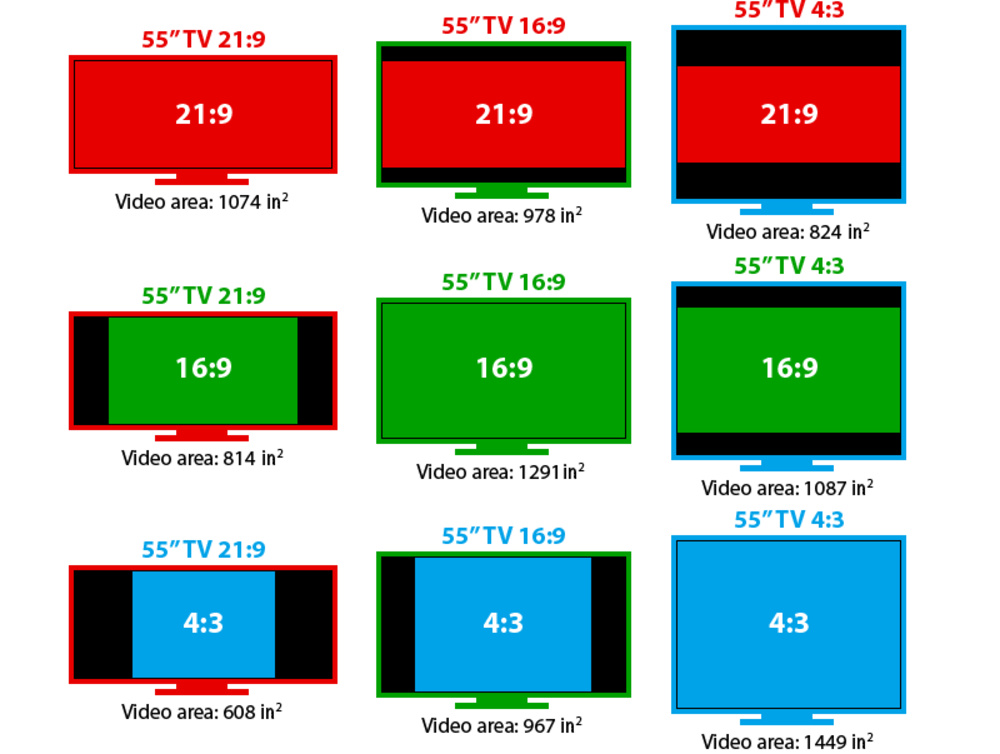
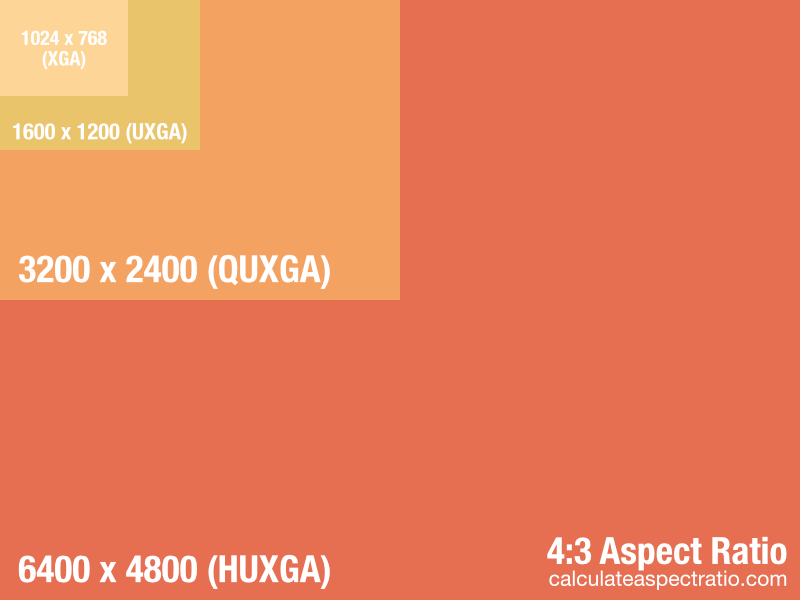
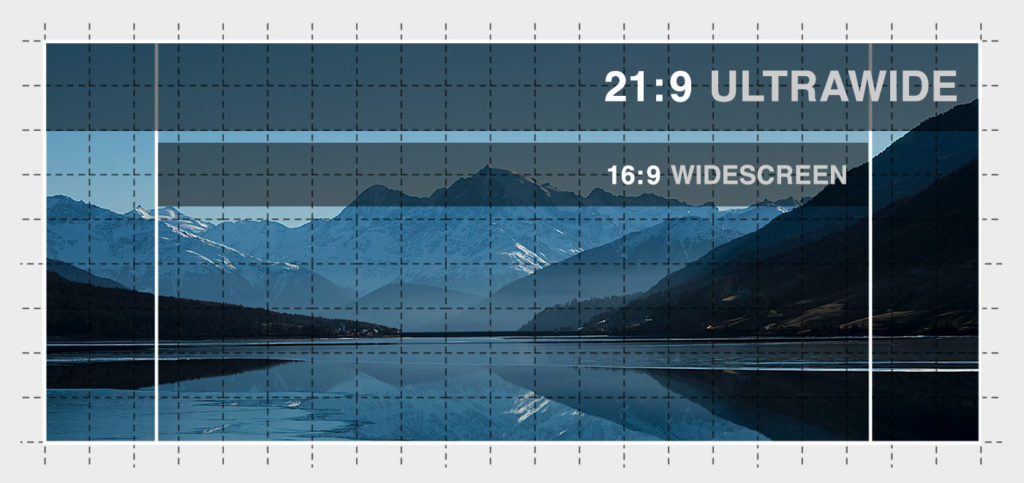
4
- 16:9 – Standard widescreen (HD, Full HD, 4K)
- 4:3 – Traditional TV format
- 21:9 – Ultrawide cinematic format
- 1:1 – Square (social media content)
DAR determines how viewers actually see your video.
How the Pixel Aspect Ratio Calculator Works
The calculator uses four inputs:
- Horizontal Resolution (Width in pixels)
- Vertical Resolution (Height in pixels)
- Display Width (in pixels)
- Display Height (in pixels)
It then calculates:
- SAR (Storage Aspect Ratio) = Width ÷ Height
- DAR (Display Aspect Ratio) = Display Width ÷ Display Height
- PAR (Pixel Aspect Ratio) = DAR ÷ SAR
The results are displayed instantly with four-decimal precision for maximum accuracy.
How to Use the Pixel Aspect Ratio Calculator
Using this tool is simple and takes only a few seconds:
Step 1: Enter Horizontal Resolution
Input the original video width in pixels (e.g., 720, 1920, 1280).
Step 2: Enter Vertical Resolution
Input the original height in pixels (e.g., 480, 1080, 720).
Step 3: Enter Display Width
Provide the width at which the video is displayed.
Step 4: Enter Display Height
Enter the display height.
Step 5: Click “Calculate”
The calculator instantly displays:
- Display Aspect Ratio (DAR)
- Storage Aspect Ratio (SAR)
- Pixel Aspect Ratio (PAR)
Step 6: Reset (Optional)
Use the reset option to clear all fields and perform another calculation.
Example Calculation
Let’s look at a practical example:
Example: Standard Definition DVD Video
- Horizontal Resolution: 720 pixels
- Vertical Resolution: 480 pixels
- Display Width: 853 pixels
- Display Height: 480 pixels
Step 1: Calculate SAR
SAR=720÷480=1.5000
Step 2: Calculate DAR
DAR=853÷480=1.7771
Step 3: Calculate PAR
PAR=1.7771÷1.5000=1.1847
This means the pixels are rectangular, not square — which explains why 720×480 can display as widescreen 16:9.
Why Pixel Aspect Ratio Matters
Incorrect PAR settings can cause:
- Stretched faces
- Squashed objects
- Black bars appearing unexpectedly
- Exported video distortion
- Broadcasting rejection
Correct PAR ensures:
✔ Professional video output
✔ Accurate rendering
✔ Proper scaling
✔ Platform compatibility
✔ Cinematic consistency
Who Should Use This Calculator?
This tool is ideal for:
- Video editors
- Filmmakers
- YouTubers
- Broadcasters
- Animation designers
- Motion graphics artists
- Post-production professionals
- Streaming platform creators
If you work with video formats, aspect ratios, or resolution conversions, this tool saves time and eliminates manual calculations.
Common Pixel Aspect Ratio Scenarios
1. HD & 4K Video
Most modern formats use square pixels (PAR = 1.0).
2. Standard Definition (NTSC/PAL)
Often uses non-square pixels.
3. DVD Authoring
Requires careful PAR calculation.
4. Broadcast Television
Older systems frequently used rectangular pixels.
5. Social Media Cropping
Incorrect aspect ratios can distort uploads.
Benefits of Using This Pixel Aspect Ratio Calculator
- ✅ Instant results
- ✅ High precision (4 decimal places)
- ✅ Eliminates manual formulas
- ✅ Works on all devices
- ✅ Beginner-friendly
- ✅ Professional accuracy
- ✅ Completely free
- ✅ No installation required
Pro Tips for Accurate Aspect Ratio Management
- Always confirm your delivery format before exporting.
- Keep PAR at 1.0 for web content when possible.
- Double-check display settings in editing software.
- Avoid resizing footage without understanding SAR and DAR.
- Use consistent aspect ratios across your project timeline.
20 Frequently Asked Questions (FAQs)
1. What is Pixel Aspect Ratio?
It defines whether pixels are square or rectangular.
2. What is the difference between PAR and DAR?
PAR describes pixel shape, while DAR describes final display proportions.
3. What does SAR stand for?
Storage Aspect Ratio — the ratio of stored resolution width to height.
4. Is 1920×1080 square pixels?
Yes, PAR = 1.0.
5. Why does 720×480 sometimes look widescreen?
Because it uses non-square pixels.
6. What is the ideal PAR for YouTube?
1.0 (square pixels).
7. Can incorrect PAR ruin video quality?
Yes, it can distort visuals.
8. Does 4K use rectangular pixels?
No, it uses square pixels.
9. How many decimal places does the calculator show?
Four decimal places for accuracy.
10. Is this tool free?
Yes, completely free.
11. Can I use it on mobile?
Yes, it works on smartphones and tablets.
12. What happens if I enter wrong values?
You will be prompted to correct them.
13. Does PAR affect file size?
No, it affects display shape only.
14. Why is DAR important?
It determines how viewers see your content.
15. Can this calculator help with DVD production?
Yes, especially for SD formats.
16. Is 1280×720 square pixels?
Yes, PAR = 1.0.
17. What causes stretched video?
Incorrect PAR settings.
18. Is ultrawide 21:9 square pixel?
Usually yes, PAR = 1.0.
19. Can I calculate cinematic aspect ratios?
Yes, enter custom display dimensions.
20. Why should I use this calculator instead of manual math?
It’s faster, more accurate, and eliminates human error.
Final Thoughts
The Pixel Aspect Ratio Calculator is an essential tool for anyone working with video resolutions and display formats. By accurately calculating SAR, DAR, and PAR, you can prevent distortion, maintain professional quality, and ensure your content looks perfect on any screen.
Whether you're editing films, producing broadcast content, creating YouTube videos, or preparing social media uploads, this calculator provides instant clarity and precision.